SecuritEase Level 7
 Version 0.5
Tim Jackson
Introduction
SecuritEase International (SecuritEase) is moving into a repurposed and upgraded physical floor at 25 Victoria Street.
The floor is level 7, and is currently split between two tenants.
The purpose of this document is to provide both a high level overview and detailed description of the controls and settings of the Ubiquity Networks (Unifi) fit out to provide SecuritEase with:
- Floor access control to a number of external and internal doors
- Security surveillance of both public and private spaces
- Monitoring and alerting based on business event rules to a 3rd party system
- Integration with Microsoft Entra Identity Service for accounts and group provisioning
- Security Controls catalogue and key decisions
Design Overview
High Level Overview
The following diagram is an overview of the components and the interconnections for both ethernet and security systems.
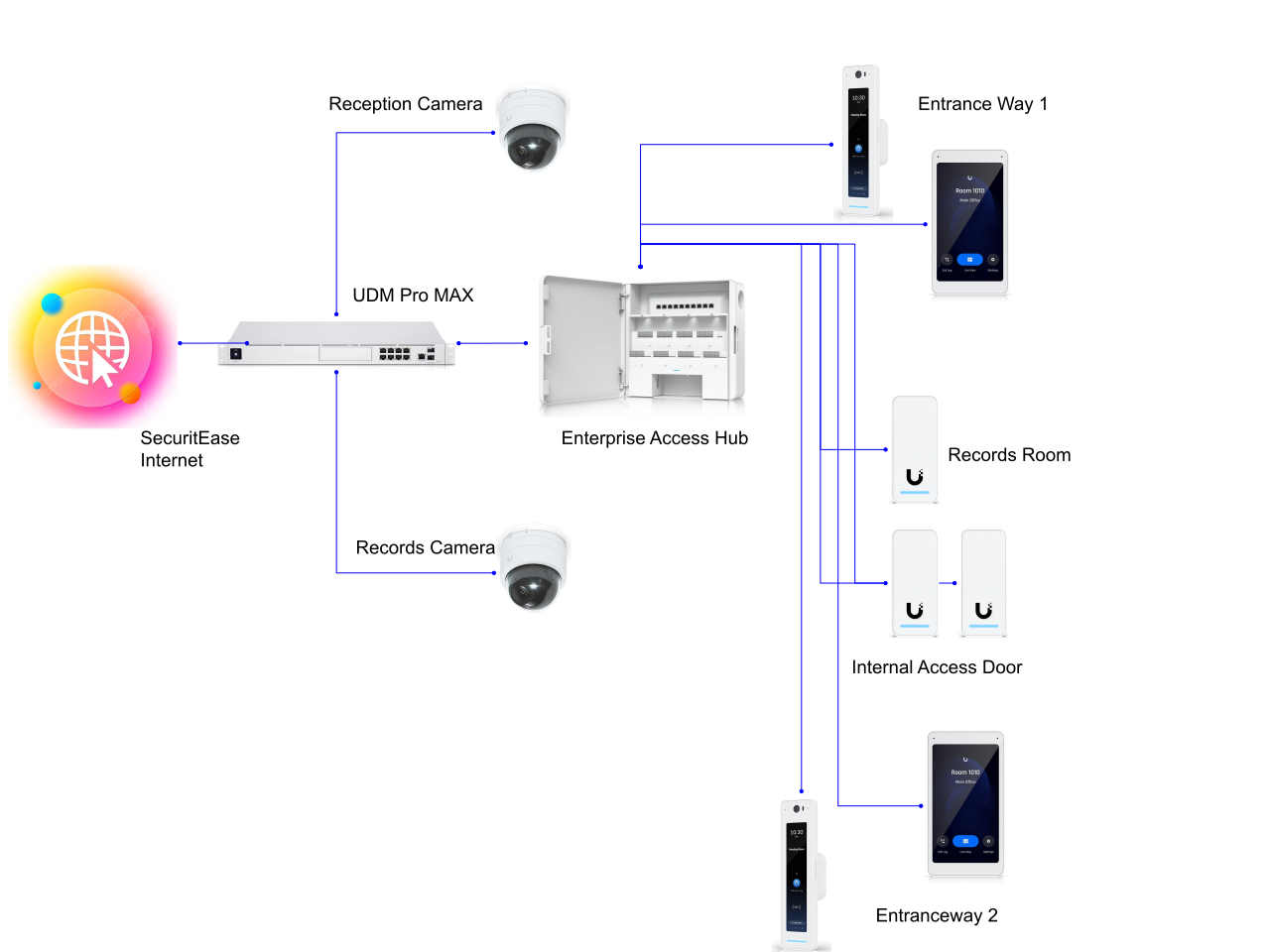
The Unifi components are shown below:
| Component | Description | Qty |
|---|---|---|
| UDM Pro Max | Controller | 1 |
| G2 Reader Pro | Advanced access reader | 2 |
| G2 Reader | Standard access reader | 2 |
| G2 Dome Ultra | 4K dome camera | 2 |
| Enterprise Access Hub | Access Hub | 1 |
| Intercom Viewer | Wall mounted touch screen viewer | 2 |
Lock Access Detail
The existing / new door locks are Lockwood 3570 series electronic mortice locks.
These locks use the existing 6 core security cable to connect to the Gallagher system. These cables will be rerouted to the Access Hub onto one of the 8 door panels.
Each door will have power to solenoid, door position sensor and request to exit enabled.
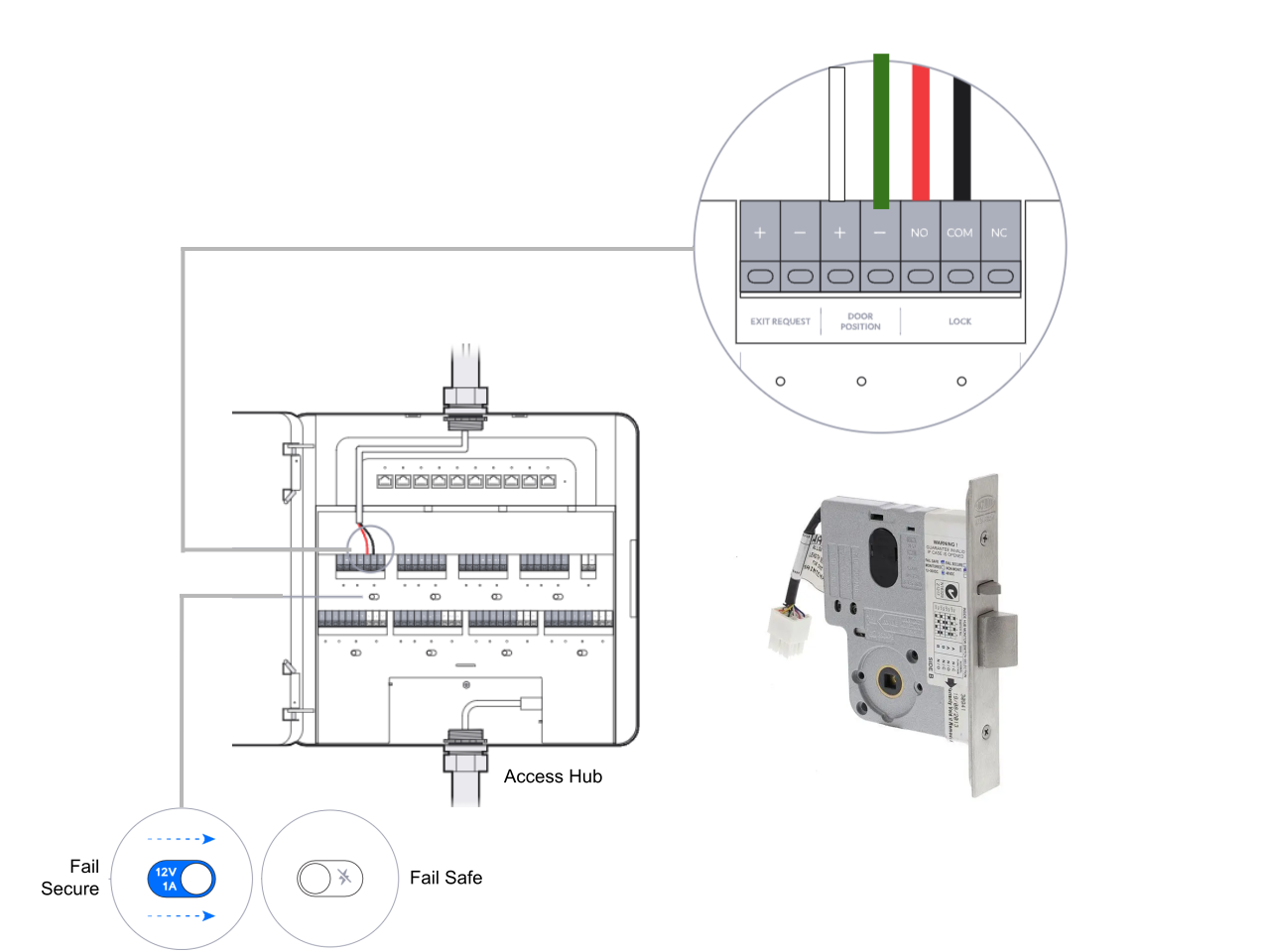
| Panel | Door | Fail Position | Description |
|---|---|---|---|
| 1 | Reception 1 | Secure | West Reception door |
| 2 | Reception 2 | Secure | East Reception Door |
| 3 | Records Room | Secure | Records Room |
| 4 | Internal Door | Open | Canteen Area |
Site Design
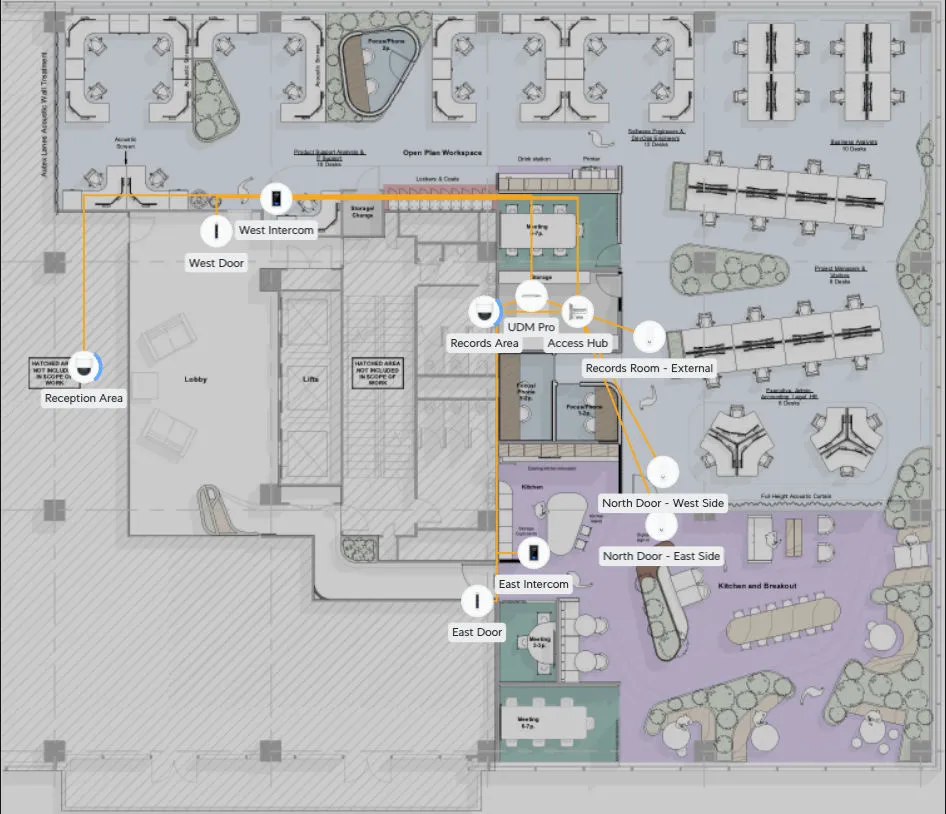
The position of the existing doors and new doors are shown below. The positions of the cameras and access keypads would be fitted to the existing locations where possible, and the cabling used a draw wire for new Ethernet cabling.
Cable Standards
All cabling must be:
| Standard | Used for | Description |
|---|---|---|
| Cat6e | Keypads, Cameras, | Ethernet should be used |
| 6 core 0.5 | Security Cabling | 0.5mm2 |
Camera Placement
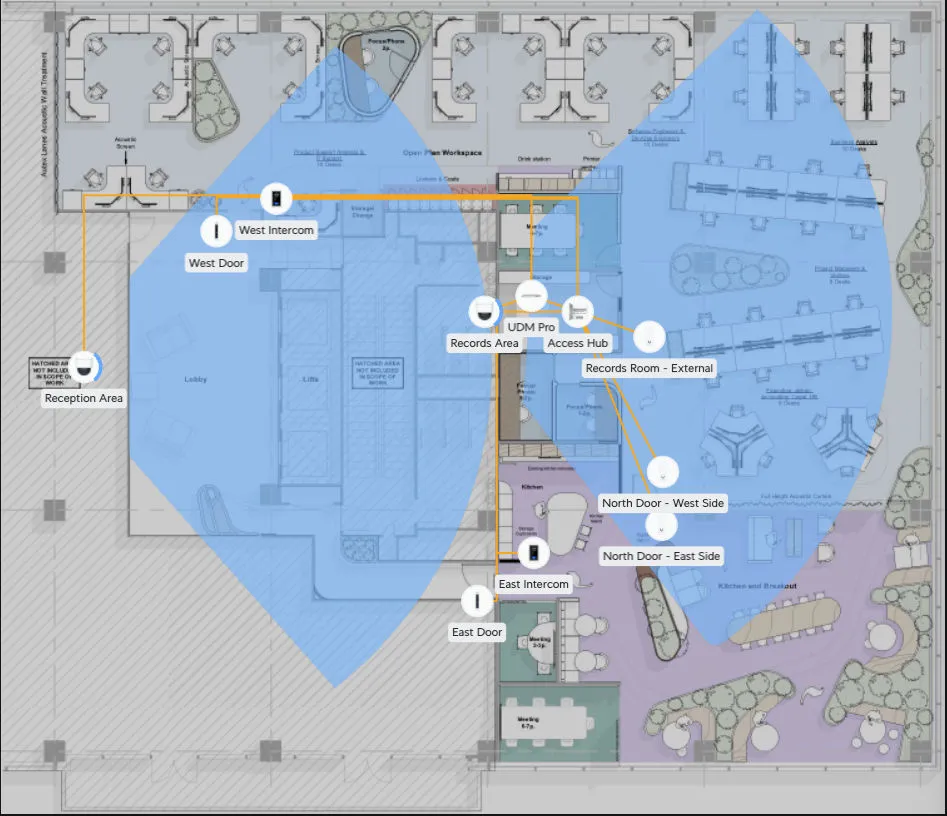
Camera placement is best guess at this stage. The requirement is to clearly identify people and objects coming from the lifts or stairwells in the reception areas.
Cameras are present for staff health and safety given no clear view of non office space behind locked glassless doors.
In the records room, clear view of anyone in the room so as to monitor safety given this is a secured area with controlled access.
The following is a representation of the camera viewpoints based on:
- Camera type
- Location
- Ceiling height
This does not represent the view of cameras located in the access doors.
Security Controls
Building Evacuation
This is not a legal document - however references to certain legislation and the impact on decisions is documented and the decisions made by SecuritEase captured as controls.
Fire and Emergency New Zealand (Fire Safety, Evacuation Procedures, and Evacuation Schemes) Regulations 2018
Section 5
Owner and tenants of building must maintain means of escape from fire for building.
-
The owner and every tenant of a building must maintain the means of escape from fire for the building so as to ensure that:
- the means of escape are kept clear of obstacles at all times; and
-
exit doors are unlocked and free of barriers or blockages so that the building’s occupants can leave the building in the event of a fire emergency; and
-
smoke-control and fire-stop doors are kept closed unless they are kept open in a way that complies with the building code; and
-
stairwells and passageways are free of stored items and accumulation of waste.
-
The duty in subclause (1) is owed by a tenant only in respect of an act or omission by:
-
the tenant:
-
a person who occupies floor space of the tenant (whether as a party to a tenancy agreement, lease, sublease, or other contractual arrangement):
-
any occupant of the building who is an employee of the tenant.
:::Decison Title
All egress doors are to be set to exit without security controls - i.e. not locked. :::
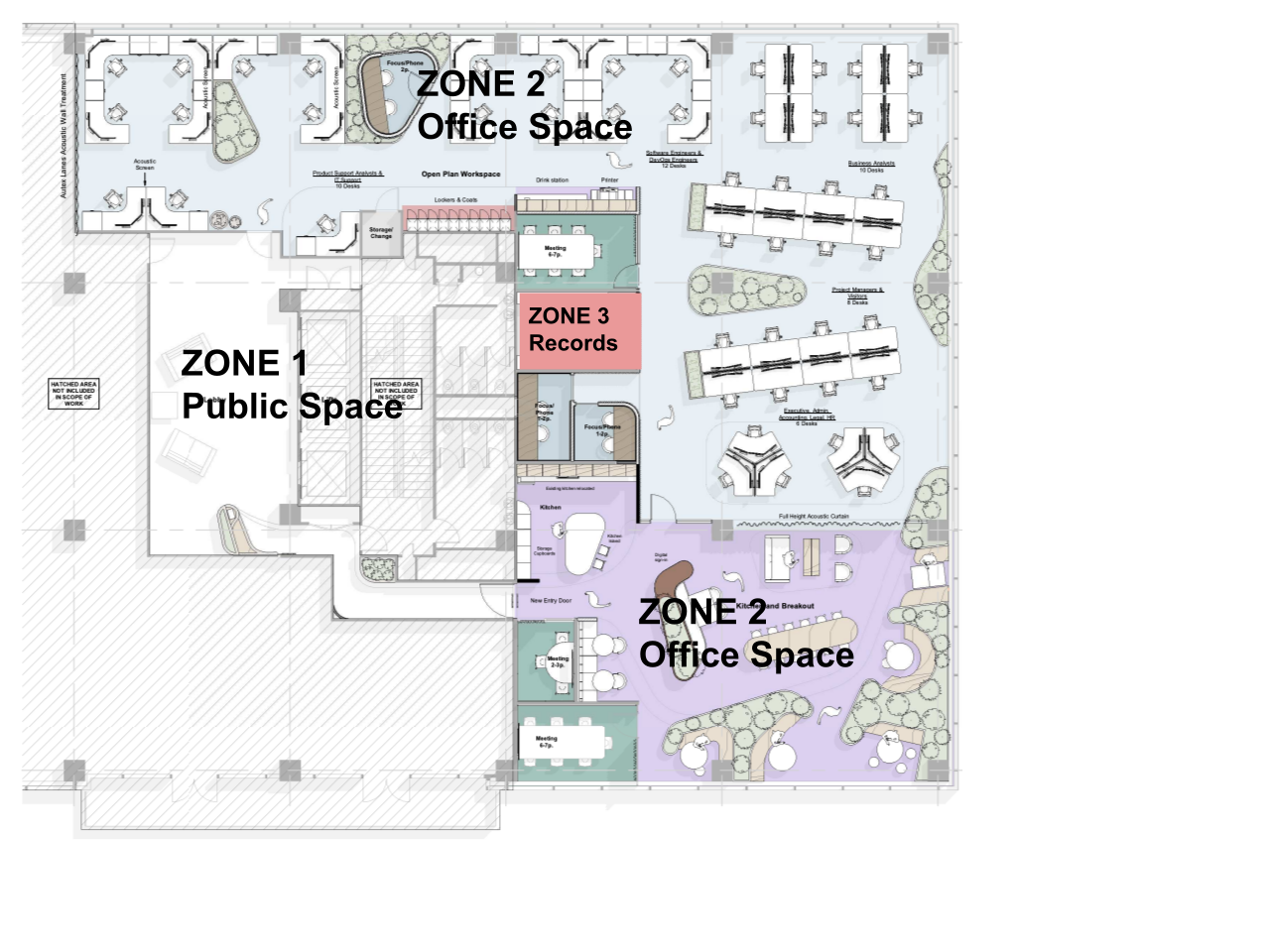
Area Zoning
The level 7 office will be zoned for access based on the guidance of the New Zealand Protective Security guidelines for Physical security,
- Zone 1 (public access)
- Zone 2 (normal office work area),
- Zone 3 (restricted work area) – potentially the Records Room, else it would also fall under Zone 2.
Network Components
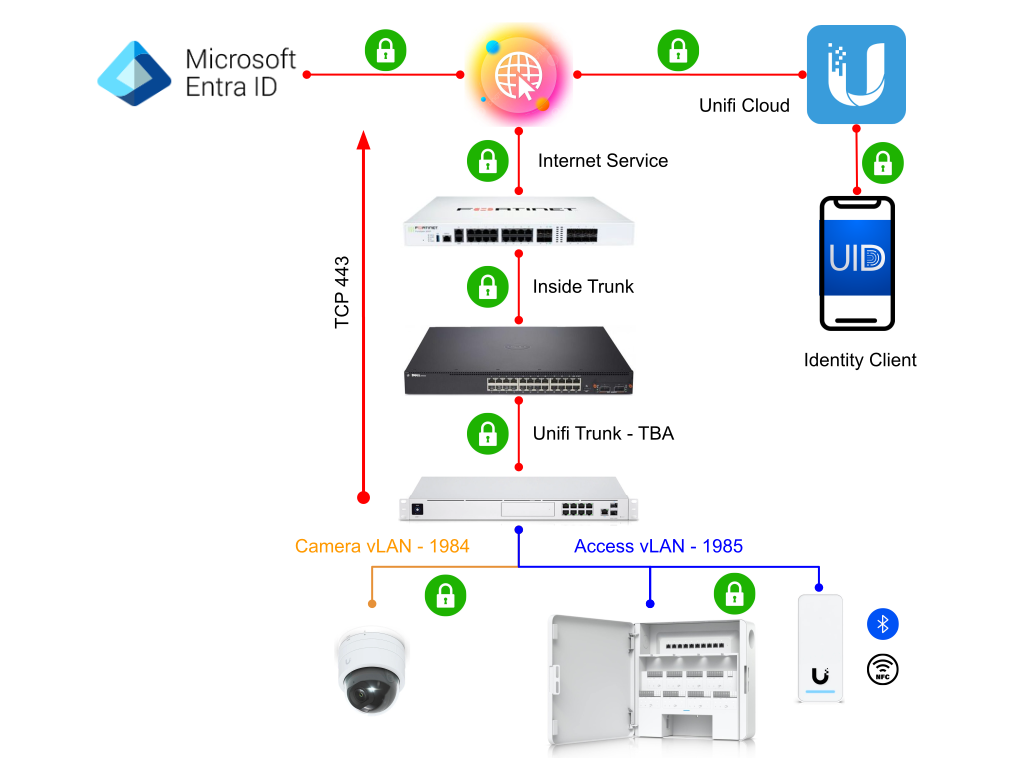
The following diagram explains the connectivity between all the components in solution
| Component | Protocol | Direction | Notes |
|---|---|---|---|
| Entra ID | SSL | Outbound | Sync is initiated from UDM |
| Access Request | SSL | Tunnelled | Identity client connects to Internet hosted Unifi Cloud service which has a SSL tunnel between itself and the UDM. Authentication requests are proxied to the UDM. |
| Local Access Request | Bluetooth LE | Inbound | Bluetooth Low Energy is used for local device based authentication between device and keypad. |
| NFC | Inbound | Encrypted NFC is used to authenticate applications to users. |
Testing and Validation
As part of any deployment, a set of test cases and plans will be provided to SecuritEase for general assurance from change.
This section is not to document the cases, but provide the overview of the required planning and documentation for the test cases.
Test cases and plans are maintained in the ThoughtLabs Test Management suite:
https://testmanagement.thoughtlabs.co.nz
Test Cases
The test cases below show the scope of smoke testing of core functionality required to validate the service pre and post changes.
| ID | Name | Description | Area |
|---|---|---|---|
| TC-1 | Unifi portal login | Connect to https://unifi.ui.com/ Authenticate | Unifi |
| TC-2 | Obtain camera feed | Connect to Dashboard Validate camera operations Check quality Check alignment | Protect |
| TC-3 | Check camera detections | Check heat mapCheck detections against targets | Protect |
| TC-4 | Check notifications | Event creation Event processing | Protect |
| TC-5 | Check storage | Check storage available | Protect |
| TC-6 | Check users | Check users are updated Check user details are correct | Access |
| TC-7 | Check Visitors | Check visitor database | Access |
| TC-8 | Check device health | Check no devices are down or degraded | Access |
| TC-9 | Check System log | Validate events recorded Validate access denial Validate unlocks recorded Validate ring event recorded | Access |
| TC-10 | Add new user / visitor | Create new user or visitor Check new user details are added | Access |
| TC-11 | Delete user | Delete a test user Validate this user has been removed from the database | Access |
| TC-12 | Add new credentials | Add a new PIN code to user | Access |
| TC-13 | Trigger Lockdown | Trigger Lockdown process Validate response on system Validate keypad response Validate intercom response Validate Lock Response Disable Lockdown | Access |
| TC-14 | Trigger Evacuation | Trigger Lockdown process Validate response on system Validate keypad response Validate intercom response Validate Lock Response Disable Evacuation | Access |
| TC-15 | Authenticate with NFC | With a registered and valid NFC card, check response in the following: - Access Granted - Access Denied - Audio response from keypad | Access |
| TC-16 | Authenticate with App | With a registered and valid registered Unifi Identity App, check response in the following: - Access Granted - Access Denied - Audio response from keypad | Access |
| TC-17 | Authenticate with BLE | With a registered and valid registered Unifi Identity App, check response in the following: - Access Granted - Access Denied - Audio response from keypad | Access |
| TC-18 | Authenticate with PIN | With a registered and known user with an allocated PIN, check the following: - Correct PIN = Access - Incorrect PIN = Denied Check impact of too many failed attempts (not configured). | Access |
| TC-19 | Authenticate with Face | With a registered and valid Unifi Identity App, and a registered Face. On the G2 Pro keypads only. Check response in the following: - Access Granted | Access |
| TC-20 | Check Syslog Feed | Review the Syslog server by checking Unifi logs are being written to disk. Check search for recent Unifi events. | Access |
| TC-21 | Check Incident Logs | In PagerDuty - check Access Control service for recent events. | Access |
| TC-22 | Ring Doorbell | From the G2 Pro devices - press the doorbell button on the panel. Check: - Doorbell sound is heard - Ringing is then heard | Access |
| TC-23 | Remote Open door | From an Intercom panel, select a door, and click unlock. | Access |
| TC-24 | Open secured door - external | With the door closed and locked. Then, ensure the handle cannot be turned. | Access |
| TC-25 | Close secured door | When a secured door is closed, check to hear the lock engage after 10 seconds of opening. | Access |
| TC-26 | Open secured door - internal | When exiting a secure area, ensure you can exit the door by operating the handle. | Access |
| TC-27 | Check Slack/Teams | Check the relevant Slack/Teams channel for any messages or notifications recently. | Access |
| TC-28 | Check Email Notifications | Check the relevant email account for any messages or notifications recently. | Access |
| TC-29 | Check Email for Access request | For new users provisioned on the system - check that an email containing a credential download link, and an authorisation code is included in the message. | Access |
| TC-30 | Check Email for Visitor request | For new visitors provisioned on the system - check that an email containing a PIN code is received. | Access |
| TC-31 | Add new NFC Card | In the Access Portal, add a new card. Select a reader, and place the new card. Ensure the new card is registered. | Access |
| TC-32 | Download and install endpoint | In the access request email, click the link to download the client. | Access |
| TC-33 | Load new credential | With a compatible client installed, click the credential link to load the credential onto the device. | Access |
| TC-34 | Load New Face | In a compatible endpoint, load a new face into the profile. | Access |
| TC-35 | View camera feed | In the endpoint, view a camera feed. Ensure the appropriate privilege is granted. | Protect |
| TC-36 | Modify NFC card | Select user / visitor Select existing card Modify thew card to a new one. | Access |
Test Plans
The following test plans are a high level view of the activities to validate functions against required outcomes.
| ID | Test Case | Test Cases | Status |
|---|---|---|---|
| TP-1 | Access Request | TC-1, TC-15, TC-16, TC-17, TC-18, TC-24, TC-25, TC-4 | DRAFT |
| TP-2 | Access Denied | TC-18 - With incorrect PIN, TC-24, TC-4 | DRAFT |
| TP-3 | New Visitor | TC-1, TC-10, TC-7, TC-30 | DRAFT |
| TP-4 | Emergency Evacuation | TC-1, TC-14 | DRAFT |
| TP-5 | Lockdown Mode | TC-1, TC-13 | DRAFT |
| TP-6 | Grant Access | DRAFT | |
| TP-7 | Modify Card | TC-1, TC-36 | DRAFT |
| TP-8 | New User Sync | TC-1, TC-6, TC-9 | DRAFT |
| TP-9 | Incident Response | TC-1, TC-14, TC-21 | DRAFT |
| TP-10 | Intercom Operation | TC-22, TC-23, TC-24 | DRAFT |
| TP-11 | Notifications | TC-1, TC-(15-19), TC-4 | DRAFT |
| TP-12 | New User | TC-1, TC-10, TC-12, TC-29, TC-33, TC-(15-19) | DRAFT |
Standards
The following table is a subset of the known standards for the solution.
| Area | Standards / Spec |
|---|---|
| Unifi Access Reader | |
| Connectivity | BLE 4.1 |
| NFC Frequency | 13.56 MHz |
| NFC Read Range | < 30 mm |
| NFC Standards | ISO 14443A, 14443B, 15693 |
| NFC Technology | NFC Tag 1,2,3,4,5 MIFARE Classic MIFAREPlus MIFARE Ultralight MIFARE DESFire |
| Certifications | CE, FCC, IC, UL 294, CAN/ULC-60839-11-1 |
| Video Cameras | |
| Resolution | 4MP 2688 x 1512 (16:9) |
| Certifications | FCC, IC, CE |
| Night Mode | Built-in IR LED illumination and IR cut filter |
Appendices
Decision Table
The following is a list of key decisions and ownership.
| Decision | Description | Rationale | Owner | Decided |
|---|---|---|---|---|
| Use Microsoft Entra for Identity | Company standard for staff identity. | James Winskill | Undecided | |
| PIN codes for access | Allow PIN codes for access | Pin codes remove the need for NFC cards, especially for visitors. Can be used as a second factor. | James Winskill | Undecided |
| PIN code complexity | 6 digit code for access | More complex, easier to remember. Balance security for ease of use. | James Winskill | Undecided |
| Access System Log Retention | Never delete logs | Logs are stored on devices and also in SIEM. | James Winskill | Undecided |
| Video recording on access | Maximum 2 minutes | For correlation with access attempts. | James Winskill | Undecided |
| On Audio on Video | No audio is recorded | Privacy reasons | James Winskill | Undecided |
| Door unlock recordings | Only video | James Winskill | Undecided | |
| Door unlock recording retention | 30 Days | Privacy and we don’t need to keep events data. | James Winskill | Undecided |
| Auto send invitations when a user has an email | Set to enabled | To reduce the administration of creating separate emails for new user registration. | James Winskill | Undecided |
| Require a verification code when loading a credential | Set to required | This is to safeguard a credential email compromise. Email is needed along with the link. Forwarding an email is tracked. | James Winskill | Undecided |
| Deploy firmware or application updates Weekly | Vendor recommended updates managed for deployment | Maintaining a balance between security and functions. | James Winskill | Undecided |
| Integration into PagerDuty | Webhook used to push events and notifications to support Incident response activities. | Incident response platform to ensure on-call teams and escalation is undertaken in a timely way. Traceability of actions and incident acknowledgement. Assignment of incidents using defined workflow. | James Winskill | Undecided |
| External Siren | Connecting the system to an external siren or sounding device for audible warnings. | Could enhance the “silent” alarm capability. Potentially used as a deterrent? | James Winskill | Undecided |
| Integration with Building alarm | For evacuation management | If the building alarm was to sound, this could trigger the emergency or evacuation procedure. | James Winskill | Undecided |
Controls Table
The following table describes the key control features of the service, and the rationale behind their use.
| Control | Description | Rationale |
|---|---|---|
| Separation of Networks | All networks are segmented and have no associated direct routing. All traffic is isolated to vLANs and Access control lists are used to inspect traffic. | Reduced surface area for attack. Good practice |
| Multiple Layers of Security | VLAN separation with Access Control Lists and network inspection installed on all VLANs. | Defence in depth, network based IPS / IDS deployed using another technology to protect against attackers. Network based honeypots deployed to lure potential attackers for identification and escalation. |
| Secure Doors and Frames | All doors are hardened wood with recessed mortice locks with tamper resistant casing. | High quality components designed to repel common entry attacks. |
| Access Control Panels | Access panels are PoE connected to a separate network VLAN and have assigned IP addresses based on MAC address and device type. No internet access is available on the network, and the default network is the VLAN gateway on the Unifi. | High quality devices with ability to service many different types or authentication requests. Future face ID and second factor access controls to help safeguard access. |
| Auditing and Logging | All access is logged to the gateway, and Syslog can be used to send logs for further analysis and exception mapping. | Visibility and future correlation of event data for trending and analysis. |
| Visitor Management | System managed visitor database for managing temporary / non staff users. Assignment of access policies and timeframes. Access control via NFC or PIN code. | Required ISO 27001 control to ensure a safe and secure physical environment. Provides ability to determine who is onsite for emergency and evacuation. Health and Safety. |
| Maintenance and Testing | All components are under a regular update train, with monthly security and feature updates by the vendor. Device firmware is maintained and controlled centrally. | Maintaining the latest security and service features is key to good practice and leveraging investments in service. |
| Security Surveillance | Cameras in public areas, and in secure environments to safeguard staff. | Health and Safety but also good practice security and assurance. |
| External Viewports to Reception | Enables staff in a secure area to see who is in a public space before entry. | Heath and Safety for staff before opening a door to a potentially unsafe environment. |
| Separate Gateway / Corporate Network design | Service takes a VLAN from the corporate environment with only Internet access. | Controlled egress between Access services and corporate environment. |
| Integrated Identity Service | Internal identity service used to support local administration and visitor databases. | Important to keep local access in the event of a network outage, and keeping non staff out of the company identity system. |
| Activity based detection and response | ||
| Integration with SE SIEM | ||
| Webhooks for 3rd party notifications | ||
| High security locks | ||
| Separate network and security cabling | ||
| Incident Response |
Constraints Table
The following table provides a list of known constraints that have presented themselves during the initial build of the service.
| Constraint | Description | Treatment | Owner |
|---|---|---|---|
| Entra Sync - Push | Microsoft Entra can only sync changes such as new users or new groups. It currently does not deprovision or amend groups to existing users | Manual process to true up. | James Winskill |
| Cloud Backups | The system can produce automated cloud backups. | Determine this is an acceptable place for system level backup data. Alternative is manual backups to local storage. | James Winskill |
Schedules Table
| Name | Schedule Hours | Schedule Days | Holidays |
|---|---|---|---|
| Business Hours | 07:00 - 18:00 | M,T,W,T,F | Off |
| After Hours | 18:00 - 00:00 | M,T,W,T,F | Off |
| Weekend Hours | 07:00 - 18:00 | S,S | Off |
| Extended Weekend | 07:00 - 23:00 | S,S | Off |
| 24 Hours | 00:00 - 00:00 | M,T,W,T,F,S,S | Off |
Policies Table
| Name | Description | Location | Group | Schedule |
|---|---|---|---|---|
| Business Hours | 07:00 - 18:00 - Monday → Friday inclusive | All locations | Business Hours | |
| 24 Hours | 24/7 access | All locations | 24 Hours | |
| After Hours | 18:00 - 23:00 - Monday → Friday inclusive | All locations | After Hours | |
| Weekend Hours | 07:00 - 18:00 - Saturday → Sunday inclusive | All locations | Weekend Hours | |
| Extended Weekend | 07:00 - 23:00 - Saturday → Sunday inclusive | All locations | Extended Weekend |
Admins Table
| Name | Role | Permissions | Notes | |
|---|---|---|---|---|
| Tim Jackson | tim.jackson@thoughtlabs.co.nz | Super Admin | Super Admin | Initial Admin until signoff |
| James Winskill | james.winskill@securitease.com | Super Admin | Super Admin | |
| Chris McKenzie | chris.mckenzie@securitease.com | Super Admin | Super Admin |
Role Table
| Name | Network | Protect | Control | Access | Connect | Notes |
|---|---|---|---|---|---|---|
| Super Admin | Full | Full | Full | Full | Full | System Default |
| Access Admin | None | None | None | Admin | None | |
| System Admin | View | Admin | Admin | Admin | None | |
| Camera Admin | None | None | Admin | None | None | |
| Access User | None | None | None | View | None | |
| Camera User | None | View | None | None | None |
Data Controls
The following table is in support of the Data Controls and Classification section in this document.
| ❕ | Information This section is to advise on possible inclusion into SecuritEase’s risk management system. It is not a formal record of the control, nor the risk posed. |
|---|
| Control | Control Name | Control Description | Control Owner | Note |
|---|---|---|---|---|
| Encryption at Rest | Data Encryption | RSA 2048 Encryption | System Owner | |
| Encryption in Transit | Data Encryption | RSA 2048 Signing | System Owner | |
| RBAC | RBAC Access | Role Based Access Control implemented | System Owner | RBAC used to control access to system and personnel data |
Identity Group Mapping
| ❕ | Information This is used to assign applications to the Unifi application systems. These appear as applications under the Unifi Identity service, and provide a consolidated view of services to an end user. The users should only be allocated to this via a Group / Entra mapping. |
|---|
| Identity Group | Access Policies | Protect Cameras | Notes |
|---|---|---|---|
| SecuritEase | |||
| Business Day | Business Day | TBA | |
| After Hours | After Hours | TBA | |
| All Times | Business Day After Hours Weekend | TBA | |
| Weekend | Weekend | TBA | |
| Weekend Extended | Weekend Extended | TBA | |
| Records Room | Records Room | Records Room | TBA |
| Cameras | Camera View Camera Admin | Reception Records Room East Door West Door | TBA |
Entra Group Mapping
| Entra Group | Identify Group | Notes |
|---|---|---|
| Business Day | Business Day | TBA |
| After Hours | After Hours | TBA |
| All Times | All Times | TBA |
| Weekend | Weekend | TBA |
| Weekend Extended | Weekend Extended | TBA |
| Records Room | Records Room | TBA |
| Cameras | Cameras | TBA |
| Camera Admin | TBA |
Operational Processes
The following table is a list of the operational processes required to administer the service.
| ID | Process | Description | Notes |
|---|---|---|---|
| P01 | True Up AD | ||
| P02 | Add / Remove User | ||
| P03 | Manual Update User | ||
| P04 | Update Group | ||
| P05 | Upgrade Applications | ||
| P06 | Routine Configuration Test | Test door operation and impact of disabling access | |
| P07 | Manual Backup / Restore | ||
| P08 | Assign / Unassign Credentials | Cards, NFC, and Application credentials. | |
| P09 | Add new Cards | ||
| P10 | Add / Remove Visitor | ||
| P11 | Emergency Mode | ||
| P12 | Mobile Application Deployment | ||
| P13 | Update Event Notification | ||
| P14 | Incident Response Activities |
Control Plane Event Management
| Notification | Notification | Note | |
|---|---|---|---|
| Shadow Mode Events | Support | PagerDuty | |
| Drive Failure | PagerDuty | ||
| Drive Issue Detected | PagerDuty | ||
| Drive Installed | Not critical | ||
| Incompatible Drive | Not critical | ||
| Drive Ejected | PagerDuty | ||
| Admin Application Actions | SIEM | ||
| Updates | Support | ||
| Console Update Available | Not critical | ||
| Console Updated | Not critical | ||
| Application Update Available | Support | ||
| Application Updated | Not critical | ||
| Admin Activity | SIEM | ||
| Admin Added | SIEM | ||
| Admin Removed | SIEM | ||
| Admin Role Changed | SIEM | ||
| Admin Settings Changed | SIEM | ||
| Admin Access | SIEM | ||
| Console Ownership Transferred | SIEM | ||
| Backups | Support | ||
| Backup Created | Not critical | ||
| Backup Restored | Not critical |
Alarm Actions
The system can deal with custom actions so help notify administrators with key events.
| Action Type | Description | URL |
|---|---|---|
| Slack Post | Create a post to a Slack group | TBA |
| PagerDuty | Create a webhook to Service | TBA |
| Teams | Create a post to Teams Webhook | TBA |
Custom Alarms
The following is a list of the custom actions configured for notifications.
| Trigger | Scope | Action | Notes |
|---|---|---|---|
Alarm Manager
The following table contains a list of standard actions and alarms with the scope and action defined.
| Trigger | Scope | Action | Notes |
|---|---|---|---|
| Animal | Not deployed | ||
| Baby Crying | Not deployed | ||
| Barking | Not deployed | ||
| Burglar | PagerDuty | New Incident | |
| Car Horn | Not deployed | ||
| CO Alarm | Not deployed | ||
| Glass Breakage | PagerDuty | New Incident | |
| Motion | |||
| Package | Slack | Post | Package detection |
| Person | |||
| Person of interest | Not deployed | ||
| Ring | Slack | Post | Reception? |
| Sense Alarm | Not deployed | ||
| Sense Extreme Values | Not deployed | ||
| Sense Low Battery | Not deployed | ||
| Sense Open or Close Status Changed | Not deployed | ||
| Sense Water Leak | Not deployed | ||
| Siren | Not deployed | ||
| Smoke Alarm | Not deployed | ||
| Speaking | Not deployed | ||
| Vehicle | Not deployed | ||
| Vehicle of interest | Not deployed | ||
| Admin Access | SIEM | ||
| Admin Change Settings | SIEM | ||
| Admin Recording Clips Manipulations | SIEM | ||
| Application Issue | PagerDuty | New Incident | |
| Device Adopted or Removed | SIEM | ||
| Device Discovery | SIEM | ||
| Device Issue | PagerDuty | New Incident | |
| Device Limitation Reached |
Access Settings
Security Settings
The following is a list of the security settings in the Access service.
| Setting | Option | Notes |
|---|---|---|
| Emergency Mode | ||
| Credentials | ||
| Card | Allow 3rd Party Cards | Allow potential other cards to be used based on the security limitations of the card. |
| Pin | 6 Digits Randomised Keypad layout Allow simple PIN | This is a decision to have a complex code for users. Not enabled Not enabled |
| Face Unlock | Disabled | This is in early access currently. |
Advanced Settings
The following is a list of the security settings in the Access service.
| Setting | Option | Notes |
|---|---|---|
| Time Format | 24 Hours | |
| Region | Pacific/Auckland | |
| System Log Retention | Never delete logs | |
| Network | Isolated vLAN | Isolated network for Access and Cameras - vLAN 1984 |
| Video Recording | ||
| Maximum Call and View Duration | 2 Minutes | Defaul |
| Door Unlock Recordings | Only video | Decision to only capture video for privacy. |
| Recording Retention | Custom | 30 days retention |
| Retention Period | 30 Days | |
| Access Reader | ||
| Access Reader Language | English | |
| Entry Greeting | ||
| Greeting Sound | Yes | |
| Message | Welcome | |
| Salutation | First Name | |
| Exit Greeting | ||
| Greeting Sound | Yes | |
| Message | Bye | |
| Salutation | First Name |
Protect Settings
Recording Manager
The following is a list of the security settings in the Access service.
| Setting | Option | Notes |
|---|---|---|
| Camera Name | Camera 1 | |
| Recording Options | ||
| When to Record | Always | |
| Recording Mode | Continuous | |
| Motion Events | ||
| Seconds of motion | 1 second | |
| Seconds before event | 2 seconds | |
| Seconds after event | 2 seconds | |
| AI Events | ||
| Video Detections | Animal / Person | Vehicle is not relevant. |
| Seconds before event | 2 seconds | |
| Seconds after event | 2 seconds | |
| Overlay | ||
| Settings | Time, Camera Name. Logo | |
| Recording Retention | ||
| Retention Setting | Auto | |
| Delete recordings after | Not set due to auto. |
System Settings
The following is a list of the security settings in the Access service.
| Setting | Option | Notes |
|---|---|---|
| Language | English | |
| Preferences | ||
| Time Format | 24 Hour | |
| Temperature | Celsius | |
| Recovery Code | Stored in secure password safe | |
| Automate device updates | Check daily at 03:00 | |
| Archiving Accounts | Not Set | |
| Smart Detection | Set | |
| Heatmap | Set | |
| Geofencing | Set | |
| Low Latency Video | Set | |
| Timeline Scrubbing Review | Set | |
| Discovery 3rd Party Cameras | Disabled | |
| Report False Detections | Not set | |
| Auto-Adopt Bridge Devices | Not set |
Identity Settings
System Settings
The following is a list of the identity endpoint settings
| Setting | Option | Notes |
|---|---|---|
| Site Logo | SE Logo | Use default SE logo PNG. |
| Services | ||
| One Click Wifi | Not set | Not required as no Wifi inscope |
| OneClick VPN | Not set | Not required as no security gateway |
| Camera Sharing | Set | Enabled for staff with permissions |
| Identify Credentials | ||
| Auto send invitations when a user has an email | Set | Enabled to improve the workflow of new users |
| Require a verification code when loading a credential | Set |
UDM Console Settings
Console Settings
The following is a list of the console control plane.
| Setting | Option | Notes |
|---|---|---|
| Site Gateway | UDM Pro Max | |
| Settings | ||
| Name | ||
| Location / Time Zone | ||
| LED / Screen | Set | |
| Brightness | 80% | |
| Night Mode | 22:00 - 08:00 | |
| Email Services | ||
| Service Type | Custom Server | |
| SSL | Set | |
| SMTP Server / Port | TBD | |
| Authentication | ||
| SMTP Username | TBD | |
| SMTP Password | Maintained in password safe. | |
| Specify Sender Address | ||
| Sender Email | securityaccess@securitease.com | |
| Advanced | ||
| Remote Access | Set | Default |
| Direct Remote Connection | Not set | Not required |
| Analytics and Improvements | Not set | Privacy |
| SSH | Not set | Not required |
Network Settings
Network General Settings
The following is a list of the console control plane.
| Setting | Option | Notes |
|---|---|---|
| Multicast Settings | ||
| IoT Auto-Discovery | Not set | |
| Multicast Filtering | Not set | |
| Forward Unknown multicast | Not set | |
| Fast leave | No set | |
| Switch Isolation Settings | ||
| L3 Network Isolation (ACL) | Not set | L3 isolation not possible on UDM |
| Device Isolation (ACL) | Not set | |
| Global Switch Settings | ||
| Spanning Tree Protocol | RTSP | |
| Rogue DHCP Detection | Set | |
| Jumbo Frames | Not set | |
| Flow Control | Not set | |
| 802.1x Control | Not set |
| ❕ | Information The UDM Prox MAX is not a full Layer 3 switch and therefore cannot restrict vLAN interactions to the same level as a full featured layer 3 device. Therefore certain access control features of Unifi Network such as network isolation are not possible. Layer 2 and some layer 3 capabilities such as ACL are used instead to provide this capability. |
|---|
Surveillance Network Settings
The following is a list of the settings applied for the Surveillance Control Network
| Setting | Option | Notes |
|---|---|---|
| Network | ||
| Name | Survellance | |
| Router | UDM Pro MAX | |
| IPv4 | Set | |
| IPv6 | None | |
| Gateway IP / Subnet | ||
| Auto scale network | Not set | More control over allocation. |
| Host address | 192.168.10.1 | |
| Subnet Mask | /28 | |
| Advanced | ||
| vLAN ID | 1984 | |
| Guest Network | Not set | |
| Isolate Network | Set | |
| Allow Internet Access | Not set | |
| Content Filtering | None | |
| IGMP Snooping | Not set | |
| mDNS | Not set | |
| DHCP | ||
| DHCP Mode | DHCP Server | |
| DHCP Range | 192.168.10.2 192.168.10.14 | |
| DHCP Guarding | Not set | This can be set once DHCP servers are |
| DHCP Service Management | ||
| NTP Server | Not set | Not used |
| Network Boot | Not set | |
| Time Offset | Not set | |
| Option 43 | Not set | |
| WPAD URL | Not set | |
| TFTP Server | Not set | |
| Ping Conflict Detection | Set | Part of advanced conflict detection. |
| Default Gateway | Auto | Set to router |
| DNS Server | Auto | As defined by router |
| Lease Time | 86400 sec | Standard balanced lease time |
| Domain Name | Not set | Can be set later |
| Custom Options | Not used |
Network Overview
| Gateway IP | Broadcast IP | Useable IP | Range | Mask |
|---|---|---|---|---|
| 192.168.10.1 | 192.168.10.15 | 13 | 192.168.10.2 192.168.10.14 | 255.255.255.240 |
Access Network Settings
The following is a list of the settings applied for the Access Control Network
| Setting | Option | Notes |
|---|---|---|
| Network | ||
| Name | Access Control | |
| Router | UDM Pro MAX | |
| IPv4 | Set | |
| IPv6 | None | |
| Gateway IP / Subnet | ||
| Auto scale network | Not set | More control over allocation. |
| Host address | 192.168.11.1 | |
| Subnet Mask | /28 | |
| Advanced | ||
| vLAN ID | 1985 | |
| Guest Network | Not set | |
| Isolate Network | Set | |
| Allow Internet Access | Not set | |
| Content Filtering | None | |
| IGMP Snooping | Not set | |
| mDNS | Not set | |
| DHCP | ||
| DHCP Mode | DHCP Server | |
| DHCP Range | 192.168.11.2 192.168.11.14 | |
| DHCP Guarding | Not set | This can be set once DHCP servers are |
| DHCP Service Management | ||
| NTP Server | Not set | Not used |
| Network Boot | Not set | |
| Time Offset | Not set | |
| Option 43 | Not set | |
| WPAD URL | Not set | |
| TFTP Server | Not set | |
| Ping Conflict Detection | Set | Part of advanced conflict detection. |
| Default Gateway | Auto | Set to router |
| DNS Server | Auto | As defined by router |
| Lease Time | 86400 sec | Standard balanced lease time |
| Domain Name | Not set | Can be set later |
| Custom Options | Not used |
Network Overview
| Gateway IP | Broadcast IP | Useable IP | Range | Mask |
|---|---|---|---|---|
| 192.168.11.1 | 192.168.11.15 | 13 | 192.168.11.2 192.168.11.14 | 255.255.255.240 |
Network Security Settings
The following is a list of the general network security settings applied to the UDM Pro.
General Settings
| Setting | Option | Notes |
|---|---|---|
| Device Identification | Set | |
| Traffic Identification | Set | |
| Country Restrictions | Not set | |
| Ad Blocking | Not set | |
| DNS Shield | Off | |
| Internal Honeypot | ||
| Name | Winnie the Pooh | |
| Subnet | 192.168.11.1/28 | |
| Honeypot IP | 192.168.11.2 | |
| Lease Time | 86400 sec | Standard balanced lease time |
| Domain Name | Not set | Can be set later |
| Custom Options | Not used |
Intrusion Prevention Settings
| Setting | Option | Notes |
|---|---|---|
| Intrusion Detection and Prevention - Advanced | ||
| Network | Access Control Survellance | |
| Filtering Mode | Notify and Block | |
| Detection Sensitivity | Medium | |
| Dark Web Blocker | Set | |
| Block known malicious IP | Set |
Network System Settings
The following is a list of the general network security settings applied to the UDM Pro.
General Settings
| Setting | Option | Notes |
|---|---|---|
| Country / Region | New Zealand | |
| Language | English | |
| Time Format | 24 Hours |
Integrations
| Setting | Option | Notes |
|---|---|---|
| Netflow | Not set | We are not using Netflow IPFIX |
| Activity Logging | ||
| SIEM Server | Set | |
| Contents | Gateway Switches Access Control Admin Activity Clients Critical Devices Security Detections Triggers Updates | Standard settings applied. Review logs. |
| Debug Logs | Set | |
| Server Address | TBA | |
| Port | 1514 | |
| Netconsole | Not set | |
| SNMP Monitoring | ||
| Version 3 | ||
| Username | TBA | Good practice |
| Password | TBA | |
| WifiMan Support | Not set | We are not using Wifi. |
Console Backup Settings
| Setting | Option | Notes |
|---|---|---|
| Backups (Config File) | Downloaded | Created post install |
| Auto Backup | ||
| Repeat | Daily | |
| Time | 03:30 | Outside of business hours |
| Maximum Number of Files | 14 | Two weeks backup |
| Retention | Settings Only | For privacy |
Advanced Settings
| Setting | Option | Notes |
|---|---|---|
| Side Panel Tabs | Set | |
| Professional Installer | Set | |
| Debug Tools | Set | |
| Data Retention | ||
| Data Retention Days | 90 days | Stats and log retention due to SYSLOG |
| Collect Historical Client Data | Set | Traffic counts, retries etc. |
| Network Time Protocol | Auto | Set based on location. Custom NTP servers can be used if needed. |
| Email Services | ||
| Service Type | Custom Server | |
| SSL | Set | |
| SMTP Server / Port | TBD | |
| Authentication | ||
| SMTP Username | TBD | |
| SMTP Password | Maintained in password safe. | |
| Specify Sender Address | ||
| Sender Email | securityaccess@securitease.com | |
| Inform Host | Not set | Device name settings are used. |
| Device Authentication | Enabled SSH | |
| Username | Maintained in password safe. | |
| Password | ||
| SSH Keys | Not used | |
| Logging Levels | ||
| Device | Verbose | |
| Management | Verbose | |
| Remote Access | Verbose | |
| System | Verbose | |
| Wireless Connectivity | Not used. | |
| Device Firmware Release Channel | Official | This might need to be reviewed as Entra is currently in Early Access. |
| Device Update Schedule | ||
| Name | Weekly Schedule | |
| Start Time | 02:00 | |
| Repeats | Weekly | |
| On Every | Friday |
:::NOTE Information
Device firmware updates occur often. The recommendation is to apply these soon after release. :::
Most updates are either security or additional application functions.
Data Classification
Classification Types
Based on the NZ Government Data Classification Policy.
| Level | Description | Notes |
|---|---|---|
| Level 1 | Publicly Available Information | Public information only |
| Level 2 | Restricted Information | Restricted information, PII, confidential business information and client data. |
| Level 3 | Sensitive Information | Financial information, personal health data, legal or national security information. |
Data Sources
| Source | Types | Systems | Classification |
|---|---|---|---|
| Staff Data | Name Group assignments Devices running client Assignment of NFC Assignment of user PIN Insights into access movements | Entra Unifi Management Appliance | Level 2 |
| Visitor Data | Name (First + Last) Visit Reason Email Address Person Visiting NFC Card registration PIN Code registration | Unifi Management Appliance | Level 2 |
| Access Data | Access Data / Granted / Denial Unlocks Ring / Notify Face Detection | Unifi Management Appliance | Level 2 |
| Video Data | Video recording on camera feeds Motion detection events AI event detections | Unifi Management Appliance | Level 2 |
| Audio Data | Audio recording on camera feeds | Unifi Management Appliance | Level 2 |
| Event Data | Notifications / Alarm triggers | Unifi Management Appliance PagerDuty SIEM | Level 2 |
| System Data | Device Logs System Admin Activity Update activity Client connection activity Threats data Triggers System host data Configuration Data | Unifi Management Appliance PagerDuty SIEM | Level 2 |
Systems
| Name | Description | Notes |
|---|---|---|
| Microsoft Entra | Used to populate staff data into the system. Controls group and rights assignments. Only certain groups are synced so not all staff records exist in systems. | |
| Office 365 Email | Used to send notifications of events and details for new user setup. It is used to send details to visitors (if used). | |
| Identity Application | iOS or Android application that can be used for Authentication against keypads for access control. Also provides access to other services such as camera feeds if permissions allow. | |
| Protect Application | iOS or Android application that can be used for access to camera feeds if used outside of the identity application. | |
| Access Application | iOS or Android application that can be used for physical access if used outside of the identity application. | |
| Unifi Management Appliance | Security gateway used to control policies and management over both the Protect and Access applications. Also provides a secure networking and routing function for these networks. Connected to L1 firewalls for Internet access. | |
| SecuritEase Slack | If configured - messages and notifications about events and actions can be sent via SSL to this service. | |
| SIEM / Syslog | Syslog feeds to event monitoring systems as required. | |
| SNMP | Authenticated system information used for monitoring. | |
| PagerDuty | Webhook function to send event data to on-call teams for remediation and Incident Response activity actions. |
Storage
| Name | Location | Notes |
|---|---|---|
| Unifi Cloud | North America | Secure cloud service. |
| SATA Disk | Local Device | RAID 1 encrypted disk array |
| SIEM / Syslog | TBA | Unknown - Potentially AU based Managed SIEM service |
| SecuritEase Vault | Local Device | Passwords Keys |
| SecuritEase File system | Local Device | Manual Backups |
Incident Response Design
Overview
| ❕ | Information One of the core mitigations to not having a fully monitored alarm system, is that any core system or break in attempts are reported, escalated and investigated as they occur. Good practice in Incident Response is to have any events reported in a standard way, and assign them to case owners as part of any ongoing investigation. PagerDuty has been configured to provide this capability, and used to support these outcomes. |
|---|
Business Service
Business services provide a way to model capabilities that span multiple technical services.
| Area | Setting | Notes |
|---|---|---|
| Service Name | Petone Access Management | |
| Service Description | Access control system events from Petone L7 office. | |
| Service Owner | James Winskill | |
| Team | Global Support Team |
Supporting Service
A service in PagerDuty represents a component, microservice or piece of infrastructure a team operates, manages, and monitors.
| Area | Setting | Notes |
|---|---|---|
| Service Name | Access Control Response | |
| Service Description | Response Plan to incidents relating to systems, or escalations to physical access to SecuritEase buildings or monitored systems. | |
| Service Owner | James Winskill | |
| Integrations | ||
| Event API | TBA | URL and Access Key for service webhook. |
| Slack Message | TBA | |
| Incident Workflow | ||
| Triage Event | Based on severity establish Alert areas. | |
| Assign Severity | Based on system categorisation of severity - map incident severity. | |
| Assign Priority | Assign priority based on severity | |
| Raise Incident | Create an incident - start a response process. | |
| Settings | ||
| Assign to Escalation Policy | TBA | |
| Response Policy | TBA | |
| Alert Mapping | Critical → High Error → High Warning → Low Info → Low Not Available → High | |
| Retrigger Ack Incidents | No | |
| Auto Resolve | No | |
| Responders and Stakeholders | ||
| Conference Bridge | TBA | |
| Meeting URL | TBA | |
| Response Play | P14 - Incident Response Activities | |
| Event Management | ||
| Orchestration Rule | ||
| Events create Incident | All Events Monitored | |
| All Events | Select any event | |
| Incident Priority | Set to Low | |
| Add Note | Set to Low by Rule | |
| Set Severity | Set to Warning | |
| Remediate | ||
| Documentation Link | P14 - Incident Response Activities | |
| Link Name | Access Control Response |
Monitoring Assurance
| ❕ | Information The following is a recommendation for system monitoring. This is not a replacement for any assurance standards or policies the SecuritEase has. |
|---|
| Area | Notes | |
|---|---|---|
| SNMP Monitoring | CPU Memory Network Temperature Error Logs Critical Events | |
| Event Monitoring | PagerDuty Reporting | |
| SIEM Monitoring | Syslog Monitoring | |
| Operational Checklists | Daily Backups Event history Device Events Updates Entra Sync status Visitor Cards Check against Entra for removed users | |
| Support | Support tickets related to system Escalations Vendor email notifications Change control planning BAU procedures |
**